Start your brief

Bookkeeping and accounting In build

Books that cannot be quietly changed.

Pop Street Books is accounting software for Mac, Windows and the web, built for business owners who are not accountants and for the professionals who check their work. It is in build. The ledger underneath is running today, and the app screens are being built on it.

  • 2 viewsPlain for owners, Accountant for CPAs
  • 1 ledgerUnder the Windows, Mac and web apps
  • 7 checksBefore each month closes
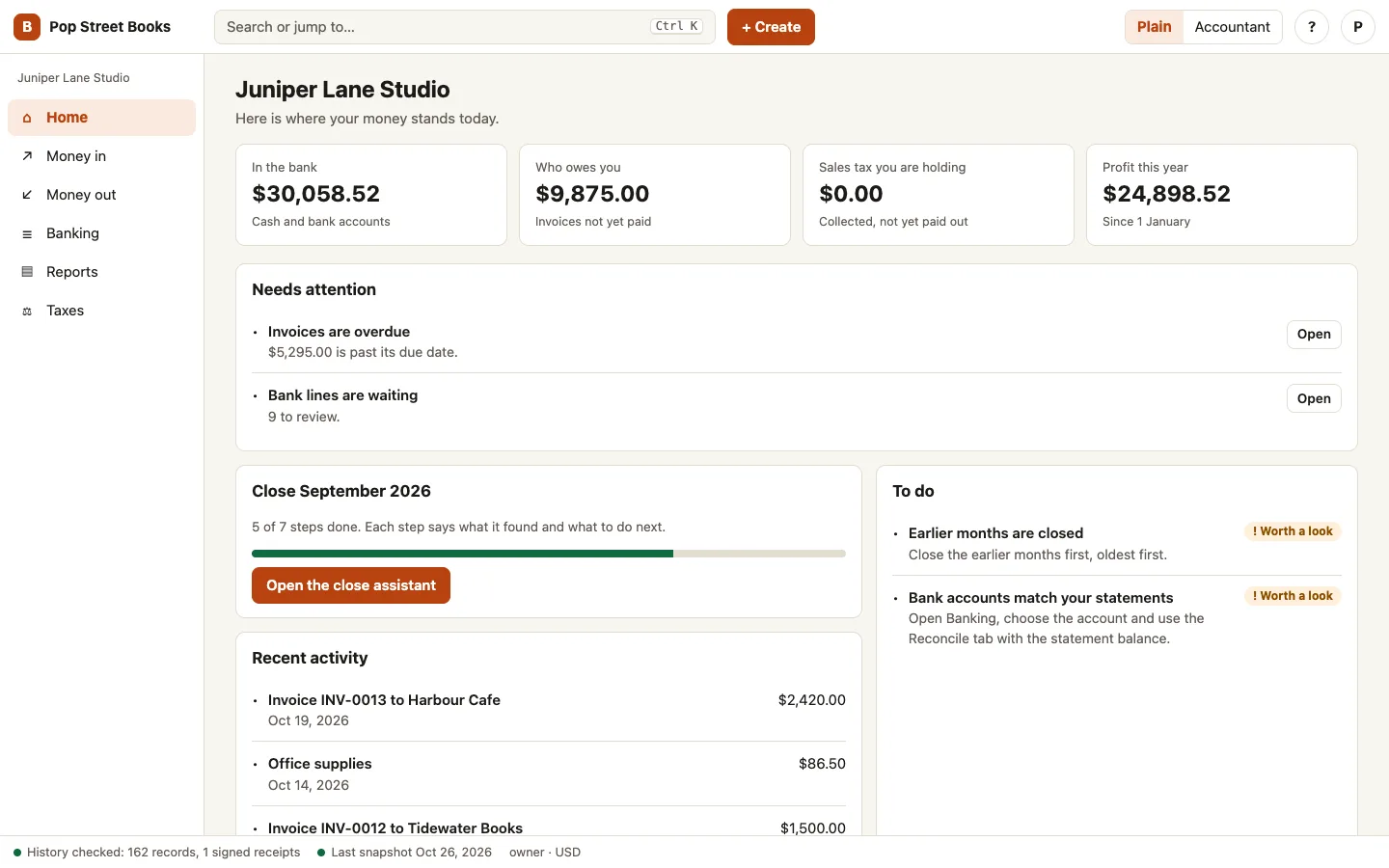
The Home screen with money in the bank, who owes you, sales tax held and profit this year, then what needs attention and where the month close stands

Who it is for

One set of books, two ways to read it

For business owners

Know where you stand without learning accounting.

  • A Home screen with money in the bank, who owes you, sales tax you hold and profit this year
  • Invoices, bills and payments in plain words, with one-click payments against several invoices
  • Bank lines matched for you, so reviewing a month takes minutes
  • A close assistant that says what is left to do before the month can be shut
  • A tour for new users and a help button on every screen

For CPAs and bookkeepers

Check the work, and trust what you see.

  • Posted entries and issued documents cannot be edited, only reversed
  • A history showing who changed what, with the value before and after, the computer and the session
  • Search the history and export it as a spreadsheet file for a client file or an auditor
  • Closed months that stay closed, and a signed receipt of the history kept outside the company file
  • A full chart of accounts, journal and month close in Accountant mode, with a tax line on every account

The screens

What it looks like today

Screens from Juniper Lane, a sample company with made-up figures. They come from the web edition running on the same ledger the apps will use.

The Home screen with money in the bank, who owes you, sales tax held and profit this year, then what needs attention and where the month close stands
HomeFour numbers an owner checks first, what needs attention, and where the month close stands.
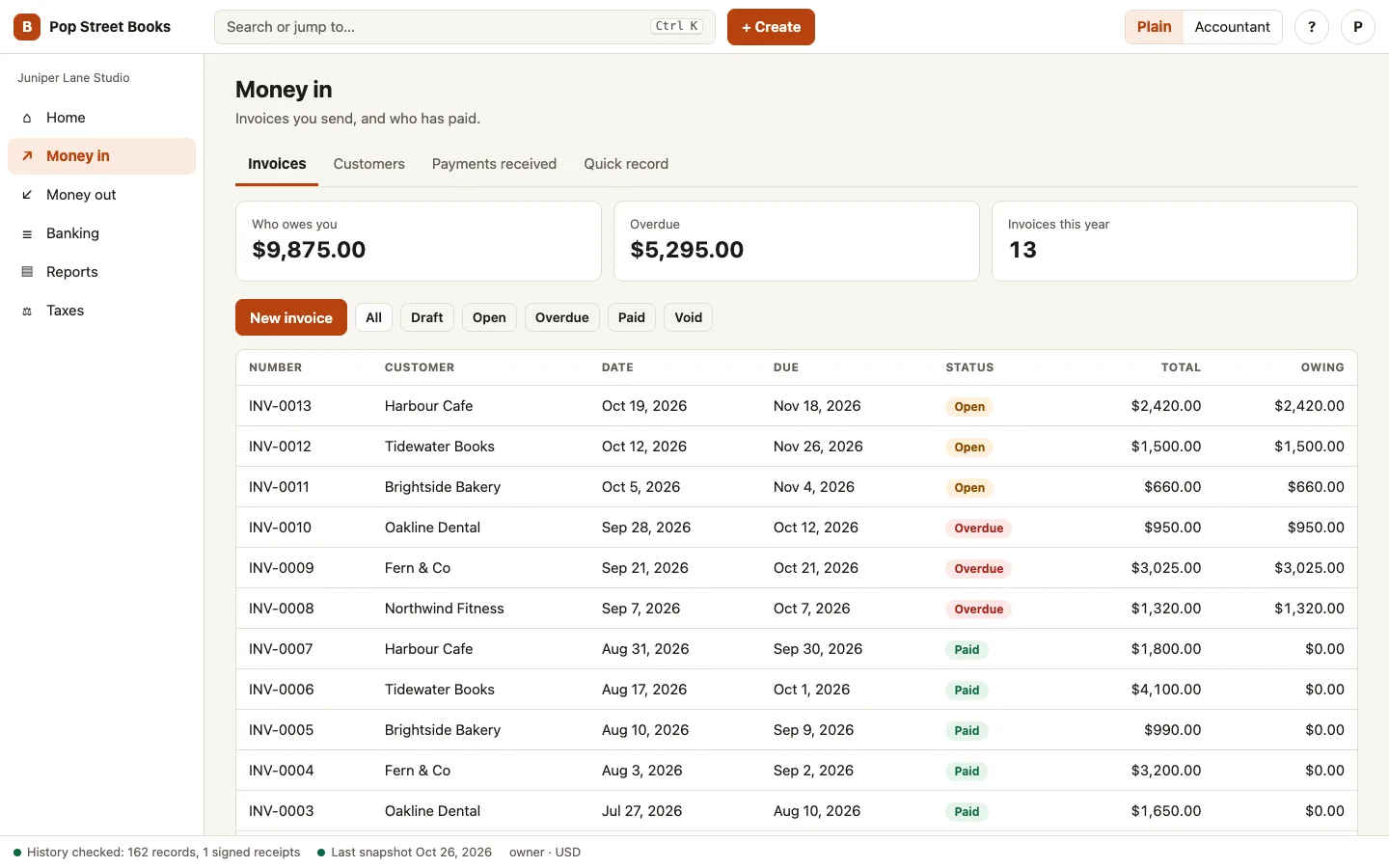
The Sales screen listing invoices with their status, customer, date and amount owing
SalesEvery invoice with its status. Open one to record a payment, print it or void it.
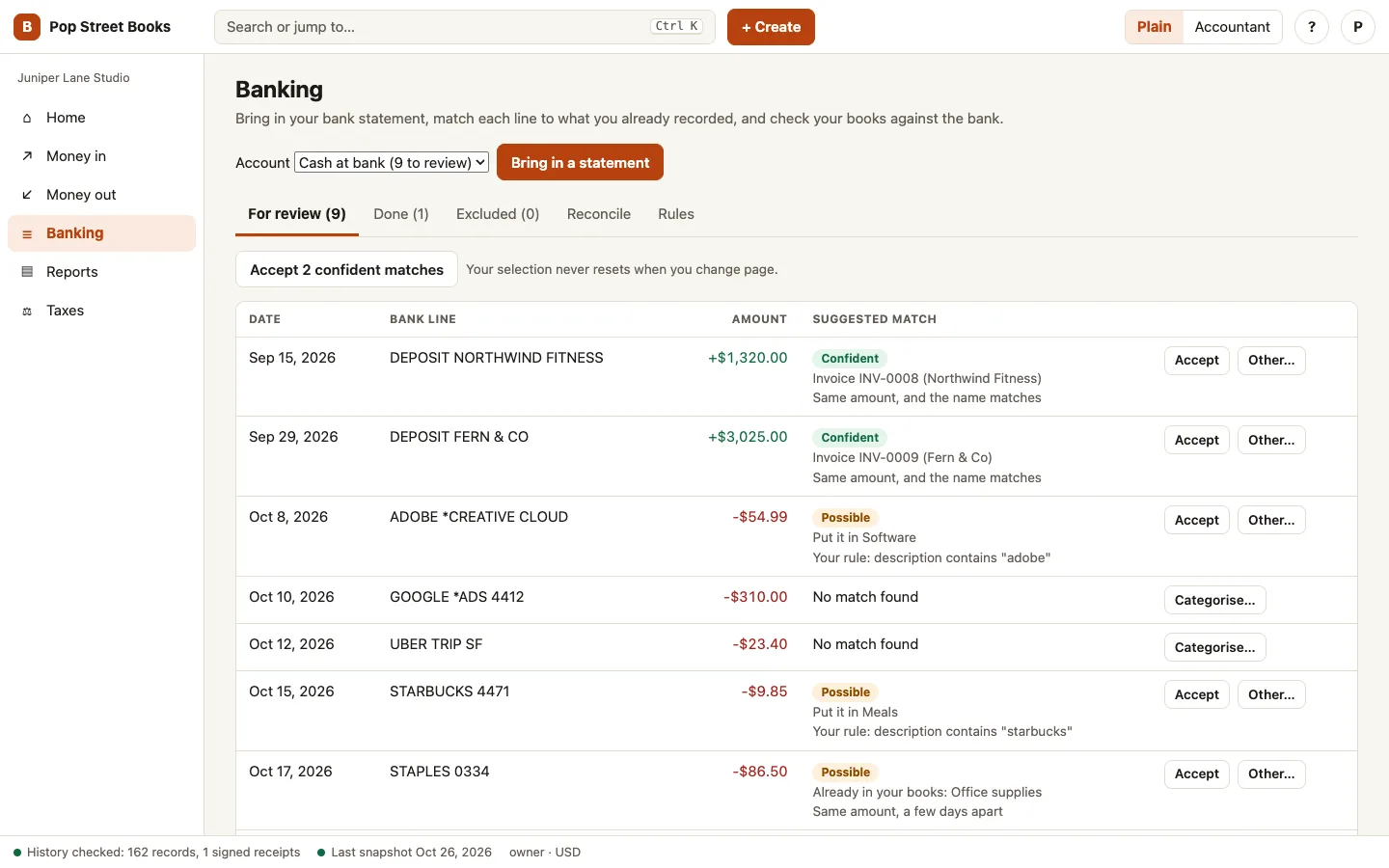
The bank review screen with imported bank lines, suggested matches and a button to accept the confident ones
Bank reviewLines from the statement with a suggested match and a reason. Accept the confident ones together.
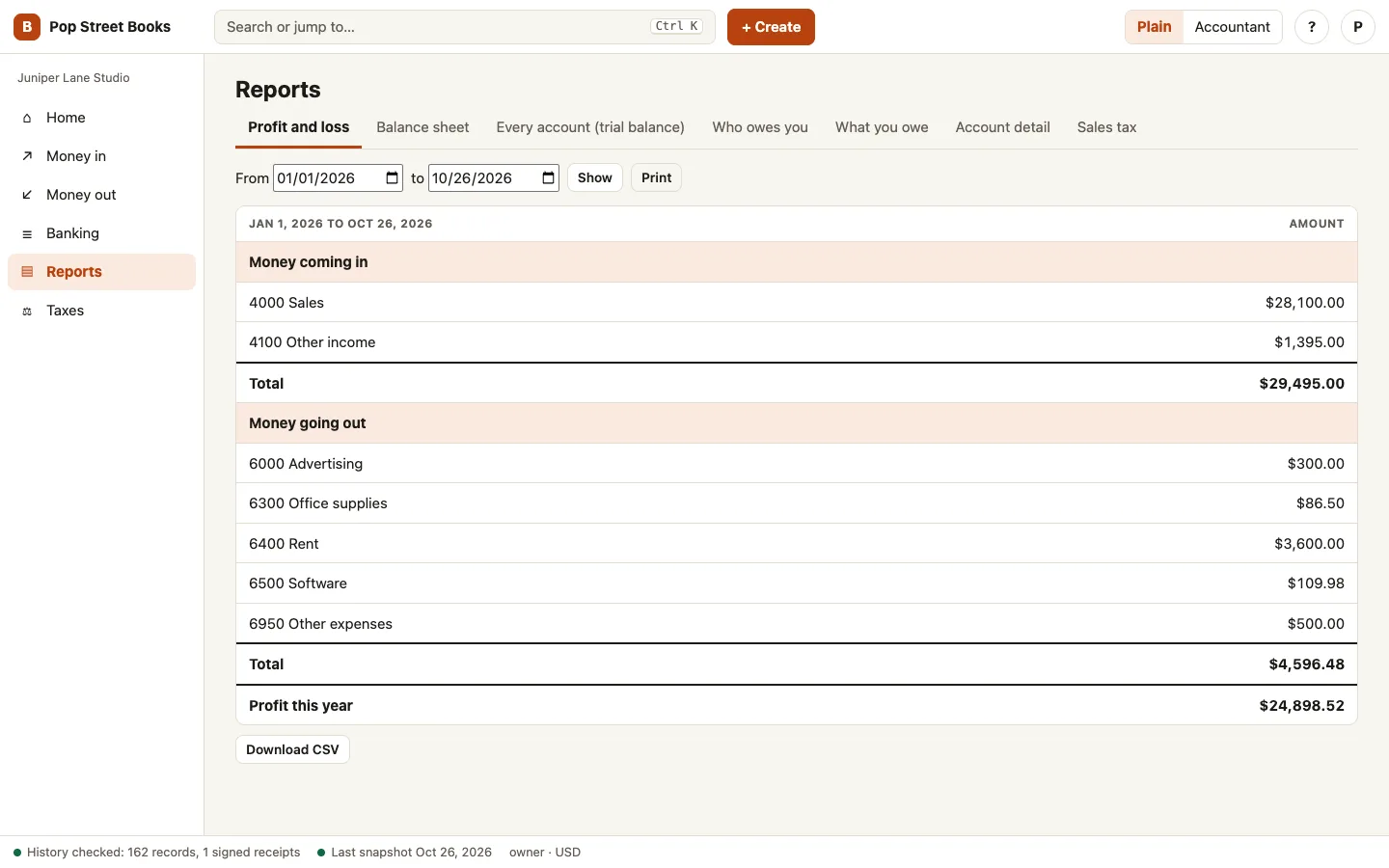
The Reports screen with a profit and loss statement for the period
ReportsProfit and loss for any dates, ready to print or download.
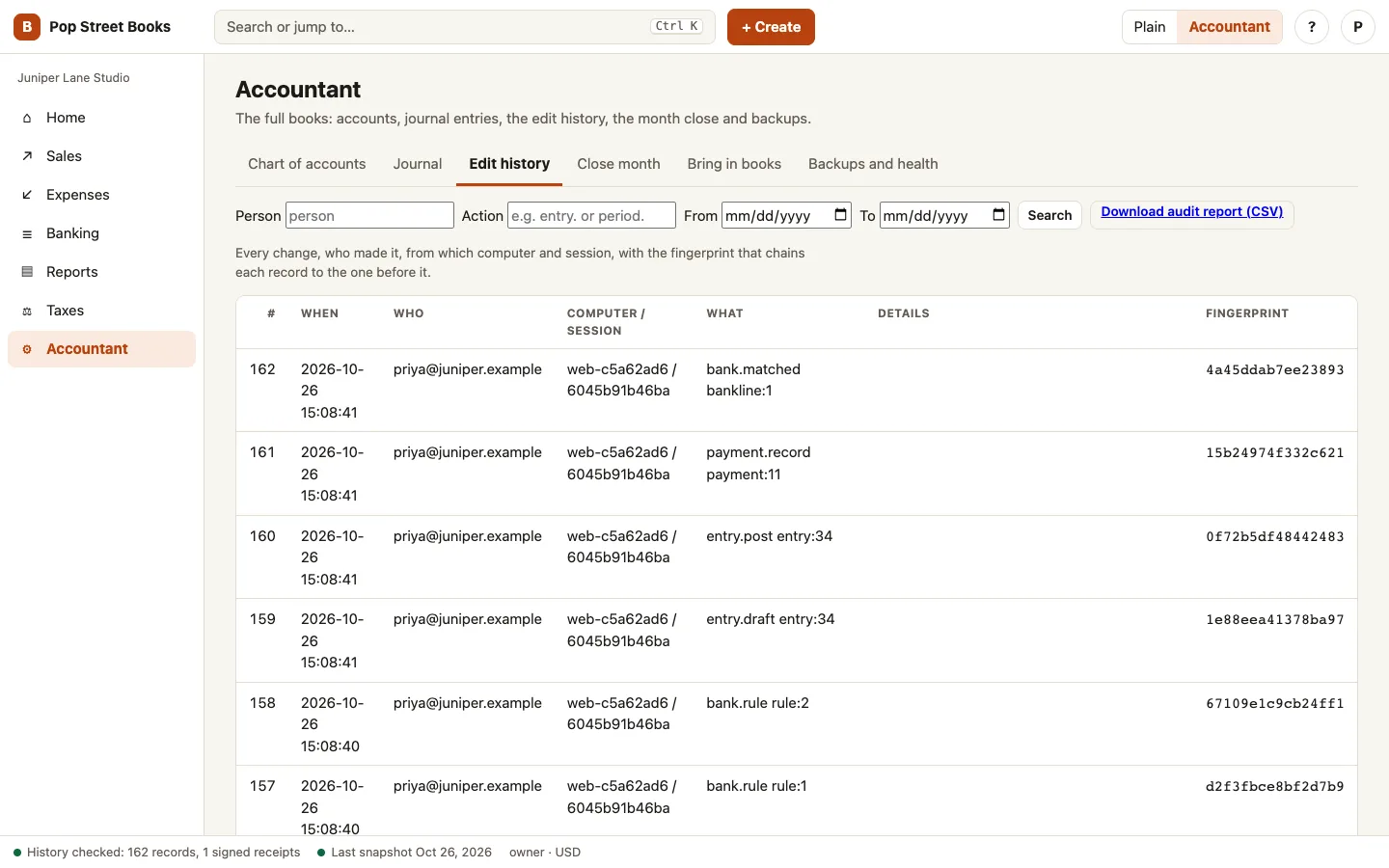
The Accountant section showing the edit history: each change with who made it, the computer, the session and a fingerprint
Accountant viewThe edit history: every change, who made it, from which computer, with its fingerprint.

Working today

What works today

Each of these runs today in the ledger and the web edition. The demo replays what it did on a sample company, so you can see it and not just read about it.

Working

Posted entries stay as they were

Once an entry is posted, nobody can edit or delete it, including a program with direct access to the company file. A mistake is fixed with a new entry that cancels the old one and points back to it.

See it in the demo (opens in a new tab)
Working

An edit history nobody can rewrite

Every change is written to a history where each record carries a fingerprint of the one before it. Altering a record breaks the chain, and the next check names the exact record.

See it in the demo (opens in a new tab)
Working

A signed receipt of the history

The engine signs the end of the history each day and saves a copy of the receipt outside the company file, in a folder you choose. If anyone later deletes the newest records, the check against a receipt names what is missing, even if they also clean up inside the file.

See it in the demo (opens in a new tab)
Working

See exactly what changed, and by whom

Every edit lists the fields that changed with the value before and after, and the person, the computer and the sign-in session behind it. Tax and bank identifiers are masked, so a secret never appears in full in the history.

See it in the demo (opens in a new tab)
Working

A searchable audit report

Search the history by person, computer, session, kind of action, subject and date, and export it as a spreadsheet file for an accountant or auditor. Backups and repairs are written to the same history.

Working

Invoices, bills and payments

Send invoices with sales tax, enter bills, record payments and apply one payment to several invoices. Who owes you and what you owe update as you go, and a voided document leaves a visible reversal behind.

Working

Bank statements, matched for you

Bring in a statement from your bank as an OFX, QFX or CSV file. Each line is matched to an invoice or bill when the amount and name agree, or filed by a rule you set once. Lines you bring in twice are spotted and skipped.

Working

Reconcile against the statement

Tick off what cleared and watch the difference fall to zero. A finished reconciliation is kept with its statement balance, and undoing one needs a reason that goes into the history.

Working

Reports an owner can read

Profit and loss, balance sheet, every account (trial balance), who owes you, what you owe, a single account in detail and sales tax, each with a CSV download and a print view.

Working

Bring in books from QuickBooks

Load a QuickBooks IIF export: accounts, customers, vendors and transactions come across, and a tie-out compares the totals with the file.

Working

Encrypted company files

Each company is one encrypted file on your computer. Account names and amounts are unreadable without the key.

Working

Plain mode and Accountant mode

The same books in two views. Plain mode says money in, money out, who owes you and what you owe. Accountant mode shows the chart of accounts, journal, edit history, month close and backups.

Working

A month-close assistant

Seven checks, from drafts and earlier months to bank matching, odd balances, tax lines and backups, each say what they found and what to do next. When nothing blocks, the month closes with one click and the result is written to the history.

Working

Windows and Mac apps in test

Test builds of both apps run today. Each opens the same screens in its own window, keeps your books on your computer with the key held by Windows or the Mac keychain, and checks your licence once before working without the internet. Signed installers are next.

Working

Checks, snapshots and repair

The file checks itself when it opens. A damaged file is kept aside and the newest snapshot that passed every check is restored. With no good snapshot the file opens for reading only, so nothing gets worse.

See it in the demo (opens in a new tab)
Where it is going

What is in build, and what is planned

In build now
  • Signed Windows and Mac installers, with the Windows app first for a CPA to review
  • Reading a QuickBooks Desktop company file directly, with a month-by-month tie-out to the original
  • A year-end package: adjusting entries, tax-line mapping and a trial balance that loads into tax software
  • Hosting the web edition for clients
Planned
  • Cloud backup and disaster recovery you can choose to switch on
  • Import from Xero, Tally and common accounting files
  • United States, Canada and India first, then other countries one at a time
  • A connection to Pop Street Commerce that records sales, fees, refunds and payouts as they happen
  • Preparing tax returns, and filing them where the tax authority approves our software

Why people switch

Built around what people dislike about accounting software

Your books stay yours

Export everything at any time. A licence that ends leaves the books open to read, export and back up.

Licensed, with no metering

A licence covers the computers and sign-ins you set up, so invoices, entries and companies are never counted. Contact us for pricing.

Corrections, not cover-ups

A mistake is fixed with a new entry that points at the old one, so the trail shows both.

Mac, Windows and web

Run it on the computer you own, or in the web edition. The numbers match, because the same ledger runs underneath.

For clients

Download the apps

The Windows and Mac apps are for licensed clients. Downloads unlock with the licence key we send when you become a client, so only people we have set up can get them. Nothing is published until each app is ready.

Built for the owner and the accountant

For owners

Plain words first: money in, money out, who owes you and what you owe. A full accountant view of the same books is one switch away.

For accountants

A complete ledger with an audit trail you can rely on, adjusting entries kept apart from the client's own, and exports that load into the tax software you already use.

For both

Your books stay yours. You can export everything at any time, and a licence that ends leaves your books open to read, export and back up.

Questions

Good questions, straight answers.

Can I use it today?

The ledger engine works today. The apps are in build, so there is nothing to install yet. Tell us you are interested and we will say when a first version is ready for you.

What is in the demo?

A made-up studio called Juniper Lane, kept by the real ledger. You can read its books, then open the cards that show what the ledger did when someone tried to post an unbalanced entry, change a posted one, add to a closed month, rewrite the history or damage the file.

Will it work with QuickBooks?

Reading a QuickBooks Desktop company file, with a tie-out to the original for every month, is the first import being built. Other sources come after.

Which countries will it cover?

The United States, Canada and India first, with each country's tax rules added as its own pack. More countries follow one at a time.

Does it work with Pop Street Commerce?

That connection is planned. The aim is for every sale, fee, refund and payout to land in your books without retyping.

Does it include free tax filing?

Preparing and e-filing tax returns is planned, and it needs approval from each tax authority before we can offer it. Until then Pop Street Books prepares the books and the year-end package your tax software loads. Tell us what you file and we will say when it is ready.

Can my clients use it without limits?

Yes. A licence does not count invoices, entries or companies. It covers the computers and sign-ins you set up, so a client can keep as many companies and as much history as they need.

Is it a subscription?

Contact us for pricing. We plan yearly and one-time licences, and a licence that ends leaves your books open to read, export and back up.

What does it cost?

Contact us for pricing. Yearly and one-time licences are planned, as with the rest of our products.

Want to hear when it is ready?

Open the demo, then tell us how you keep your books today and we will say when a first version suits you.