Dispatch your tows, repair orders and taxi trips from one system you own.
Pop Street Dispatch is one suite for towing and roadside operators, repair and collision shops, and taxi and livery bases. Today you run it as a self-hosted bundle: the Dispatch server and the web console on a computer in your office, opened in a browser by your dispatchers, with a driver app on your drivers' phones. The Mac and Windows desktop apps are in build.
Today: runs on an office computer, opens in a browser. Mac and Windows apps in build.
3kinds of business: towing, repair and collision, taxi and livery
3 to 50devices on a plan, from Starter to Business
1bundle to install today: the server, the console and the driver app
14day trial, and a read-only mode that never locks your records away
The server, the web console and the driver app are built and tested. The Mac and Windows desktop apps are in build, and we say where each part stands before you commit to anything.
Who it is for
Three kinds of business, one system
Towing and roadside operators
Calls, drivers, trucks and the yard in one place.
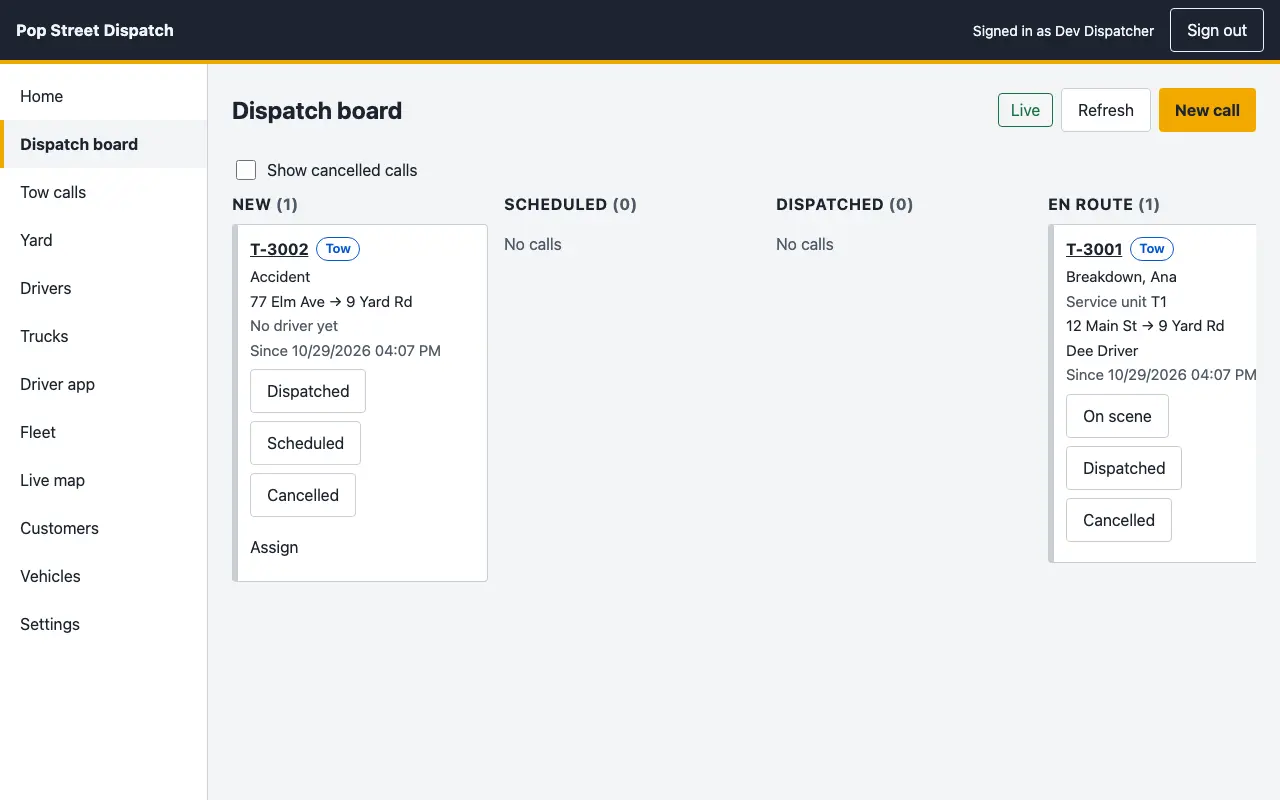
A truck and driver are assigned to each call from the dispatch board
Cars in the yard carry a lien clock and their paperwork
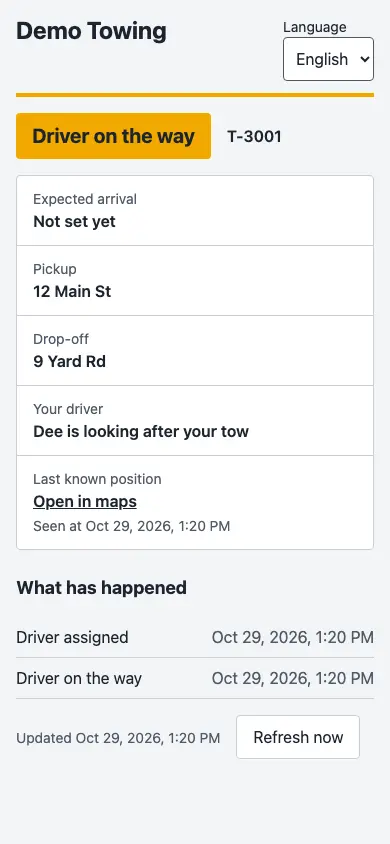
Customers follow their driver on a tracking link
Repair and collision shops
Repair orders, estimates and parts that end in an invoice.
Estimates, repair orders and parts live in the same system as the tow
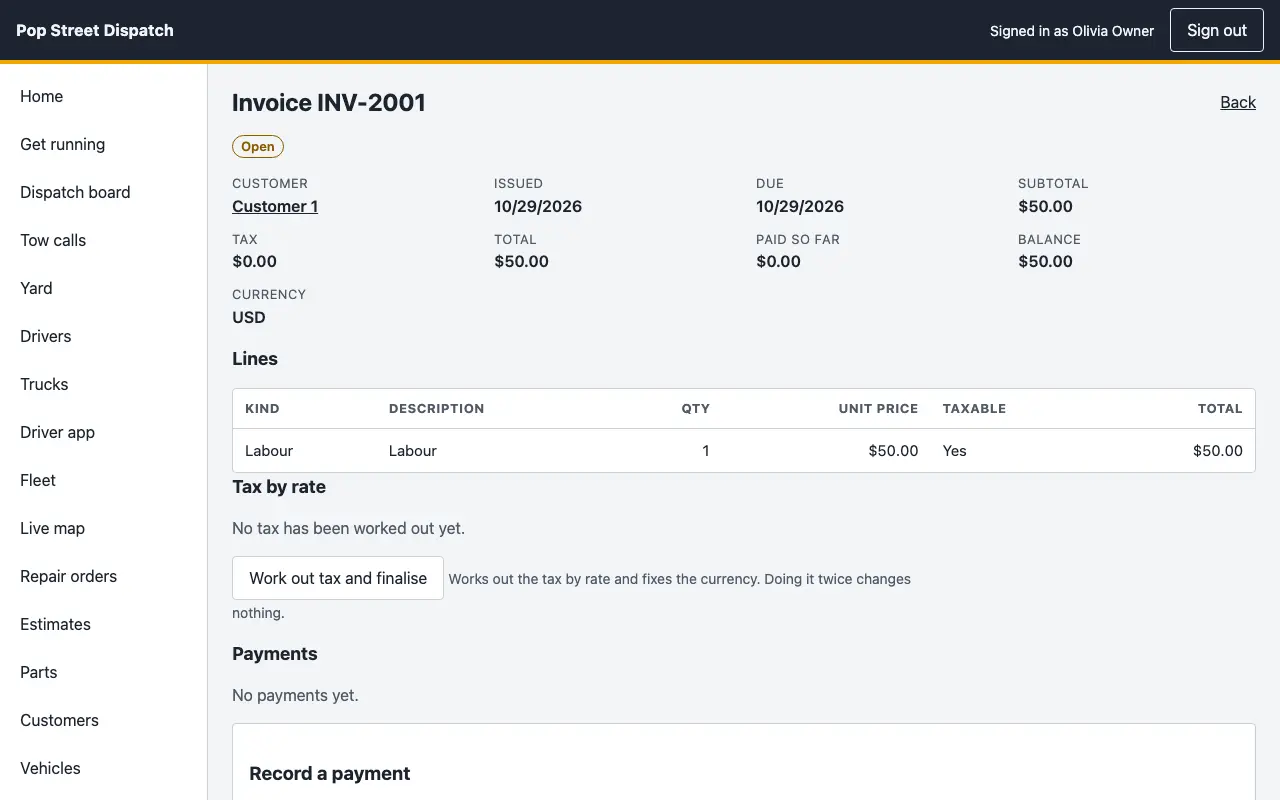
Invoices work out tax by rate and take payments
The same system runs the tow yard, if you have one
Taxi and livery bases
Trips, drivers and bookings from your own base.
Bookings from your website forms arrive in the system
Drivers and vehicles are dispatched from one board
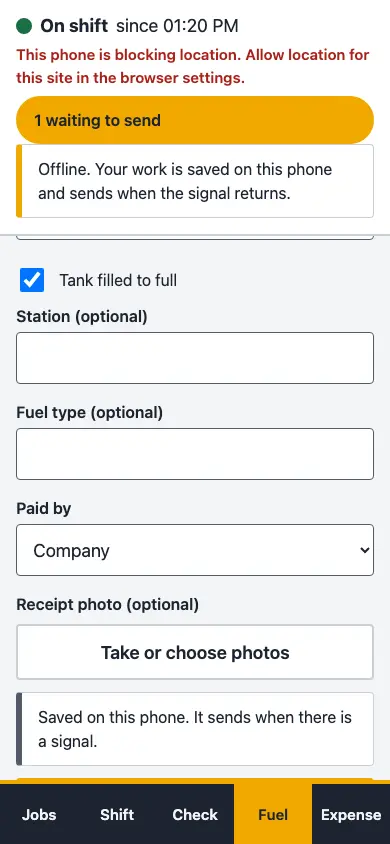
Fuel, trips and expenses are recorded from the driver app
What it fixes
Four things operators put up with, and what answers each
The problemThree subscriptions for one job Towing software, shop software and estimating software each bill separately, and each holds a different part of the same job.
One record from the call to the invoice
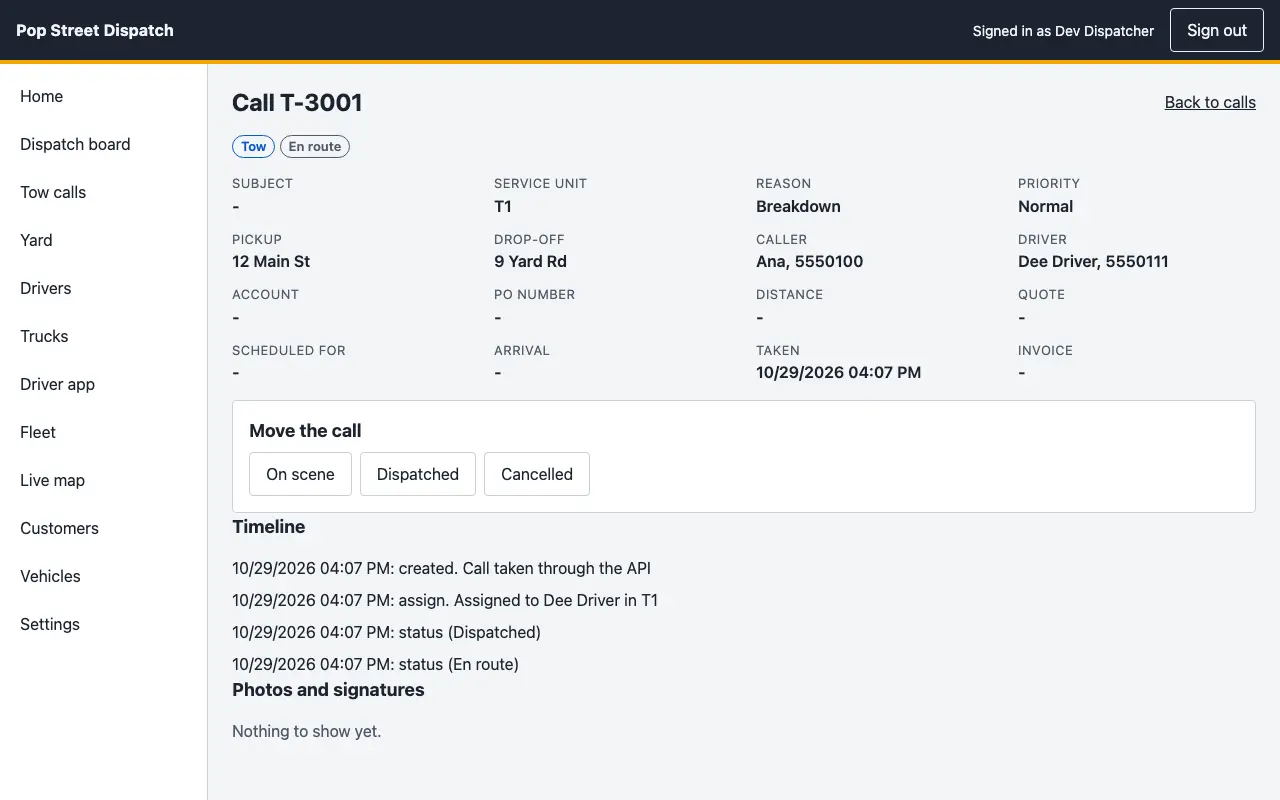
A tow call, its timeline, the repair order, the estimate, the parts and the invoice sit in the same system, with the same customer and the same vehicle.
Tuesday morningYou open the call a customer rings about and see every step of it, from the first assignment to the amount still owing, without opening a second program.
The problemData locked away Your records sit on someone else's servers and leave in whatever form they allow.
Your records on your computer, with exports and backups
The server keeps its database on the computer you choose. Fleet records export as CSV or JSON from the console, the server writes IIF and QuickBooks Online files for your invoices, and backups run from the settings.
Tuesday morningYour accountant asks for last quarter's figures and you send a file the same morning, without a request to a vendor.
The problemFees for every seat Per-person pricing grows with every dispatcher and driver you add.
Plans by devices, with the seats included
Starter covers 3 devices and 5 seats, Pro 10 and 25, Business 50 and 100. Inside those limits a new dispatcher or driver is another login.
Tuesday morningA Tuesday-only dispatcher starts at nine with a login, and nobody has to approve another line on the bill.
The problemDowntime during outages When the internet or a vendor's servers go down, so does the dispatch board.
A driver app that keeps working with no signal
Photos, fuel fills, expenses and status changes are saved on the phone and sent when the signal returns, each one once. The server runs in your office, so the board does not wait on a vendor.
Tuesday morningA driver loses signal in a tunnel, finishes the job and takes the photos anyway. They reach the record when the phone is back on the network.
One call, start to finish
One call, from the first ring to the invoice
Follow a single breakdown through the system. Each step shows what it saves you.
1
The call comes in
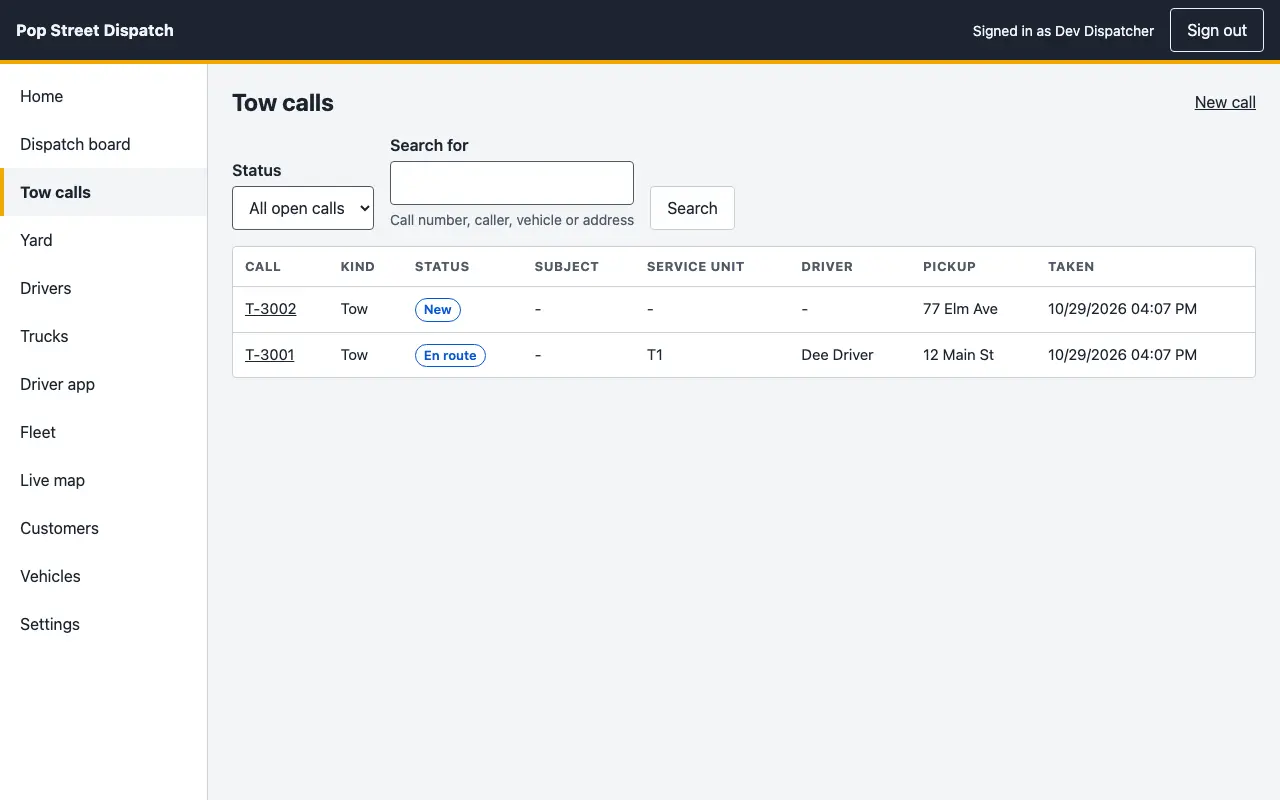
A request arrives from your website form or is typed in by the dispatcher, and it lands on the list with its address, reason and priority.
What it savesThe second phone call to ask for the address again.
2
A truck is assigned
The dispatcher assigns a driver and a truck. The card moves across the board and the call timeline records who was sent and when.
What it savesThe radio round to find who is free, and the argument later about who was sent.
3
The customer follows the driver
The customer opens a tracking link on their phone and sees the driver on the way, the pickup, the drop-off and every step so far.
What it saves"Where are you?" calls, in both directions.
4
The driver takes photos at the scene
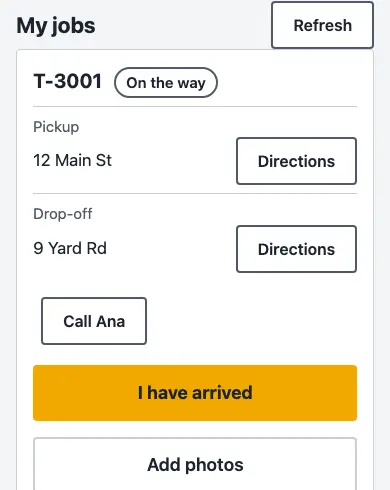
The driver sees the job on their phone with directions, taps that they have arrived and adds photos. With no signal the photos wait on the phone and send when it returns.
What it savesPhotos lost in a phone gallery, and the dispute with no proof.
5
The invoice goes out
The invoice carries the lines for the job, works out tax by rate and takes the payment against it. The server writes IIF and QuickBooks Online files for your books.
What it savesRetyping the job into a billing program at the end of the week.
CallTruckTrackingPhotosInvoice
If a licence ends
If a licence or trial ends, your records stay yours
When a trial ends or a licence lapses, Dispatch goes read-only with export. Nothing is switched off and nothing is held back.
Every call, invoice, customer and vehicle stays open to read
Everything you can export before, you can still export
Backups keep running
Only adding and changing stop, until a licence key is entered
Where it runs
You choose where the server lives
Office computer
Today. Dispatch Server runs on a computer in your shop, your dispatchers open the console in a browser on the office network, and drivers use the driver app on their phones.
Your own server
The same bundle runs on a Linux server you choose, so remote staff and drivers reach it without an office computer.
Hosted by the studio
Planned. The studio runs the server for you and you sign in with your licence key.
Connections
What it connects to
Pop Street Books, through IIF and QuickBooks Online files
Your studio-built website: tow, booking and quote forms
Webhooks to your own systems
Pop Street Commerce, planned
GPS hardware, on the Business plan
Plans
Starter, Pro and Business, by the number of devices
Starter
For a single base. Dispatch, towing and repair orders on a few devices.
The table is read from the same plan list a licence key is issued from, so it always matches what a licence unlocks.
Dispatch plans compared
Starter
Pro
Business
Trial (14 days)
Devices
3
10
50
2
Seats
5
25
100
5
Calls, jobs, drivers, invoices and reports
Included
Included
Included
Included
Towing and roadside, impound and lien tracking
Included
Included
Included
Included
Repair and collision orders, estimates and parts
Included
Included
Included
Included
Taxi and livery trips and bookings
–Not included
Included
Included
Included
Fleet module
Add-on
Add-on
Included
Included
GPS hardware tracking
–Not included
–Not included
Included
–Not included
Several locations
–Not included
–Not included
Included
–Not included
Studio relay for drivers and remote staff
–Not included
–Not included
Included
–Not included
API and connections to other systems
–Not included
Included
Included
Included
Mac and Windows desktop apps (in build)
–Not included
Included
Included
Included
Price coming soon. Ask us for a quote and we put one together for your business. Contact us for pricing
For clients
Download what is ready
The self-hosted bundle unlocks with the licence key we send you. Enter it on the download page to get your links. The Mac and Windows apps join it when they ship.
The self-hosted bundle works today: the Dispatch server, the web console and the driver app. The Mac and Windows desktop apps are in build. Ask for the 14-day trial and we will tell you what you can try today and what is still coming.
Where does my data live?
On the computer or server you choose. Everything can be exported.
What happens when the network drops?
The server runs in your office, so the board carries on. Driver phones save photos, fuel fills and status changes and send them when the signal returns, each one once.
Can I bring my records from my current software?
We plan to import the exports from the towing, shop and estimating software you use today. Tell us which ones and we will say what is supported.
What does it cost?
Plans are by the number of devices. Contact us for pricing and we will put a quote together for your business.
What happens when the trial ends, or a licence ends?
Dispatch goes read-only with export. You can still open every record, export it and back it up. Only adding and changing stop until you enter a licence key.
Is the fleet module included?
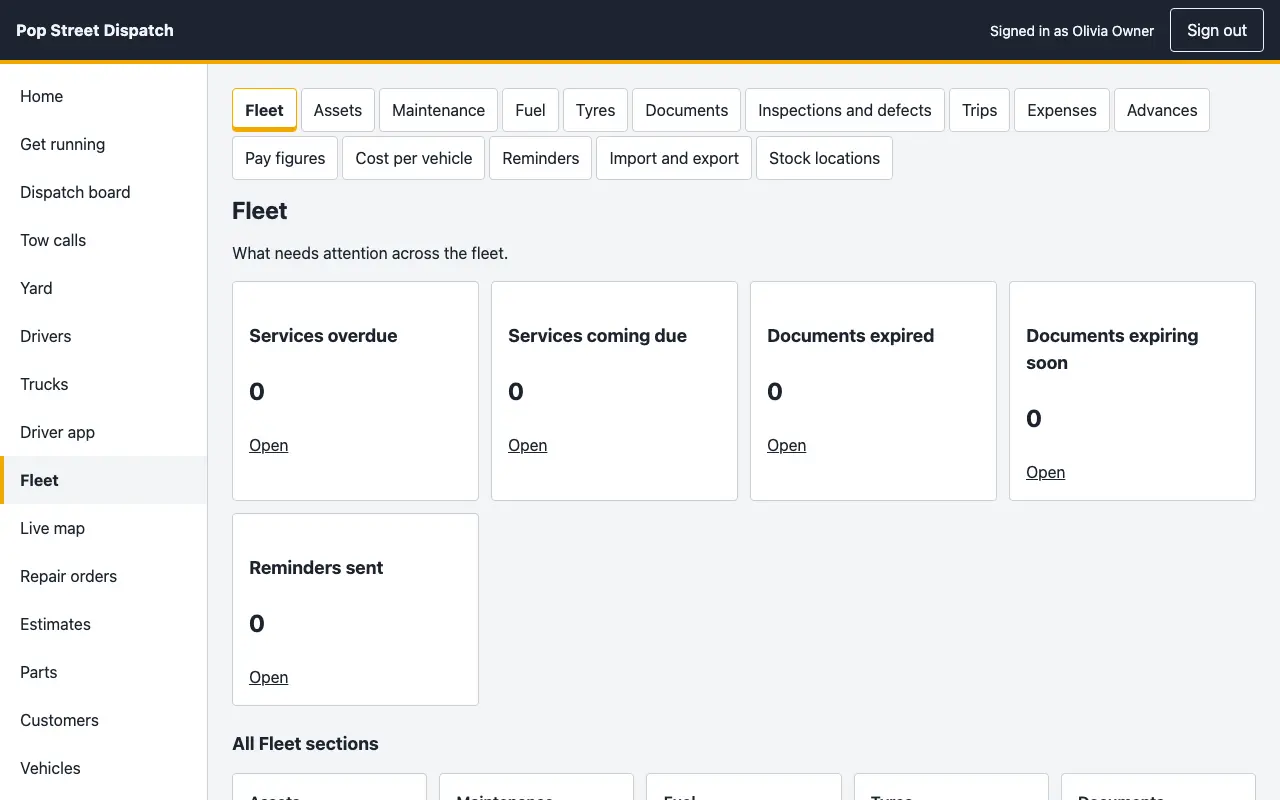
It is included in Business. On Starter and Pro it is an add-on you can buy. Without it the fleet screens stay readable and exportable.
Try Pop Street Dispatch for 14 days
Tell us what you run today and we will set up a trial that fits.